
A quicker counter
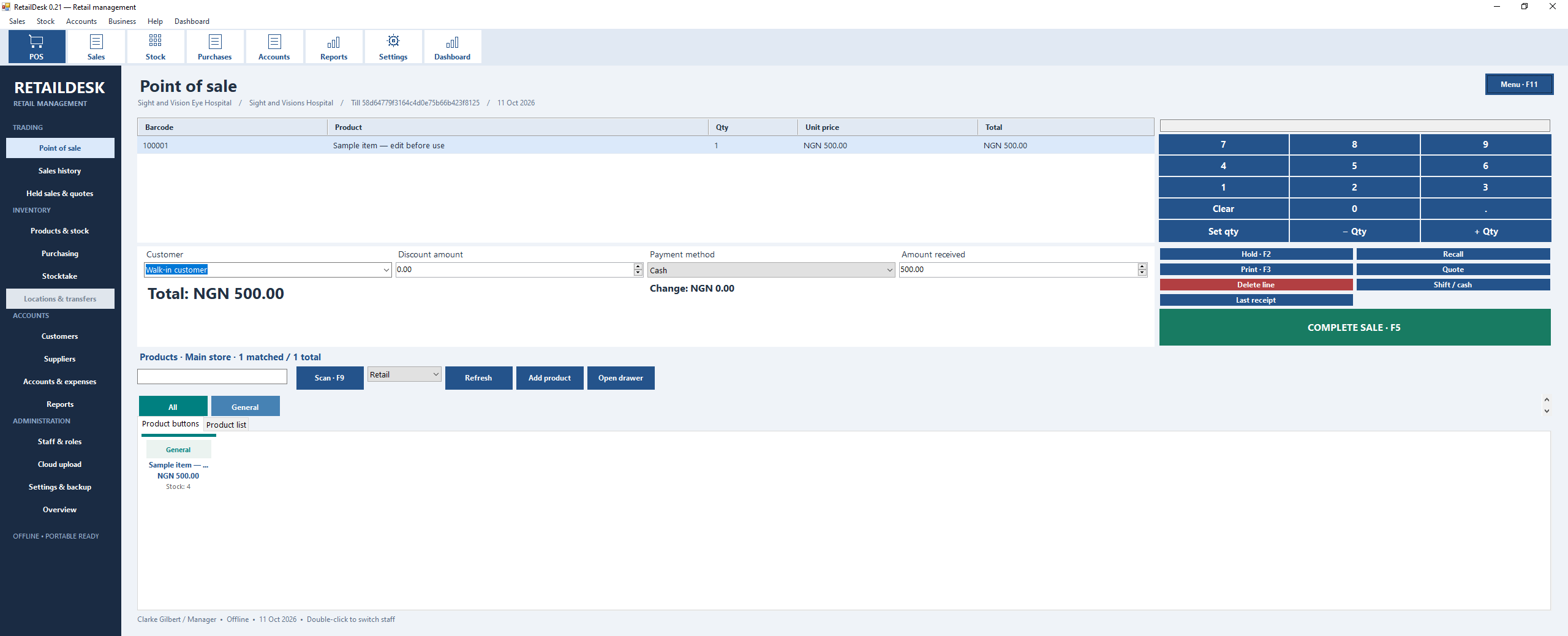
Find products or scan their barcode, build the sale, record payment and print a receipt. Cash, card and transfer records keep the sale organised.
YOUR NEXT CHAPTER AT THE COUNTER
Turn busy shop days into organised ones. Retail Desk puts checkout, stock and your team in one Windows POS — included with your Professional plan.
₦12,500 / month Retail Desk + website + AI WIZ
MEET YOUR ACTUAL SHOP COUNTER
A clear view of checkout, stock and the tools your team uses every day.
SMALL SHOP. BIG POSSIBILITIES.
Make the sale. Keep the stock in view. Give your team a clear way to work. These are the daily essentials, together.
Find products or scan their barcode, build the sale, record payment and print a receipt. Cash, card and transfer records keep the sale organised.

Keep a local product catalogue with categories, prices and stock quantities. Receive stock and see what is available before the next sale.

Record purchases, supplier details and stock received. Keep the buying side of your shop alongside the selling side.

Set up cashiers and managers in your dashboard. Control selling, discounts, returns, reports and Windows product-management permissions.

Retail Desk automatically uploads reporting snapshots when connected. View the latest uploaded Windows figures in your MyBizPage POS overview.

After online sign-in, a verified offline session can continue for up to 24 hours, within your paid subscription and session expiry. Reconnect to refresh access.
Retail Desk’s local catalogue and stock are managed separately from your website inventory. Dashboard uploads provide reporting snapshots. Card and transfer entries record payments you confirm; they do not charge a card or verify a transfer.
 YOUR COUNTER, REIMAGINEDEquipment illustration · hardware purchased separately
THE SHOP FLOOR MEETS YOUR DASHBOARD
Your Windows till handles the shop day. Your MyBizPage workspace manages staff access and shows your latest uploaded Retail Desk reports.
Sell on Windows
Work with your local products, stock and receipts.
Stay informed online
Reporting snapshots upload automatically when connected.
Keep access in your hands
Manage cashier and manager permissions from your dashboard.
FROM SUBSCRIPTION TO FIRST SALE
Start in your dashboard, then move to your Windows PC.
Get an active monthly or yearly Professional plan. Open your website dashboard, go to Settings → Module Settings and enable Point of Sale.
Open Point of Sale. Create a branch and till, add your staff, then use Devices & sync to pair the device. Download the Windows app below.
On Windows, enter your paired device token and POS staff credentials. First sign-in needs internet. Add your local products and stock, check receipt settings, and start your first sale.
READY FOR YOUR WINDOWS PC
Windows 10 / 11 · .NET Framework 4.8. An active Professional plan, paired till and staff sign-in are required to use the app.
For the portable version, extract the ZIP folder and open RetailDesk.exe.
GET STARTED WITH PROFESSIONAL
Retail Desk for your shop. A website for your customers. AI WIZ to help you build. Choose your Professional plan and bring it all together.
An active paid plan with POS enabled is required. Domain registration and renewal are charged separately.
Retail Desk POS is included with Professional monthly and yearly plans. Starter does not include POS access.
A Windows 10 or Windows 11 PC with .NET Framework 4.8, an active eligible subscription and a paired till. Download the Windows ZIP or portable ZIP from this page. For the portable version, extract the ZIP folder and open RetailDesk.exe. Then pair your till through Point of Sale → Devices & sync.
First sign-in needs internet. A previously verified session can continue offline for up to 24 hours after sign-in, capped by the session and paid subscription expiry. Reconnect and sign in again when the verified session expires.
Retail Desk’s local catalogue and inventory are separate from your online-store stock. Automatic uploads provide a reporting snapshot in MyBizPage; they do not provide two-way product or inventory synchronisation.
Retail Desk includes barcode scanning and receipt-printing workflows. Configure and test your scanner and printer on your Windows PC before using them for customer sales.
In your website dashboard, open Point of Sale → Staff. Create a cashier or manager, assign the branch and choose their permissions. Use these credentials when signing in to the paired Windows app.
YOUR NEXT SALE STARTS HERE
Bring your counter, your website and your next chapter together.
Get started with Professional